Glossary — a few terms up front
- DMZ proxy
- A host that sits on a screened network segment and serves (or reverse-proxies) traffic from the public internet.
- Apache
- The web server. Not nginx. Old, boring, battle-tested, and still the right tool for a fleet of static sites with server-side includes.
- WAF
- Web Application Firewall — software that inspects HTTP requests before your site answers them, looking for attack patterns (SQL injection, scrapers probing for login pages that do not exist, and so on).
- ModSecurity / CRS
- The specific WAF stack on the proxy. ModSecurity inspects requests; CRS is the OWASP Core Rule Set — a community-maintained library of attack signatures published by the OWASP CRS project and released on their GitHub repository.
- Fail2Ban
- Software that watches log files for repeated bad behavior and temporarily bans the offending IP at the host firewall (iptables). On this proxy it pairs with ModSecurity: the WAF blocks the request; Fail2Ban can stop the source from talking to the site at all after enough strikes.
- Static site
- HTML, CSS, and JavaScript files on disk — not a PHP app with themes, plugins, and a database. That means no WordPress-shaped attack surface: no
wp-adminprobes, no plugin remote code execution (RCE) of the week, no rigid content management system (CMS) structure or plugin tax just to change a page. - SSI
- Server Side Includes — Apache can splice shared headers and footers into HTML at request time. Different sites on this host use slightly different flavors of that trick.
- 403 Forbidden
- HTTP’s way of saying “I found the file, but you (or Apache) may not read it.” On this stack, that is often a permissions problem, not a security mystery.
The page was fine five minutes ago. I uploaded an edited paragraph, refreshed the browser, and got 403 Forbidden. The virtual host was up. TLS still looked healthy. The HTML file was sitting right where it belonged on the disk. Nothing in the application had “crashed,” because there is no application — just files and Apache.
That outage lasted about as long as it takes to run one find command and
notice that a freshly rsynced article had arrived from my Mac Studio as mode
600: readable by me, invisible to the web server user. No drama in the
error log. Nobody broke in. The site went dark because I own every step from the
editor on my desk to the public URL — and that includes the boring mistakes
that only I can make.
This is how a house in Sarasota ends up hosting a small fleet of public websites — consulting, family, ham radio clubs, Minecraft portals and map sites, the odd campaign landing page — and why I still prefer that arrangement to renting someone else’s control panel.
What Lives on the Edge of the Network
One host does almost all of the public web work: proxy.dmz.local, an
Ubuntu server in the DMZ with Apache in front and
ModSecurity
loaded with the
OWASP Core Rule Set.
Public names resolve to it; private LAN names resolve inside the house. Certificates
for the public sites come from Let’s Encrypt. An internal operations console on
the same box is locked down to private networks and uses a self-signed cert, because
that dashboard is not for the world.
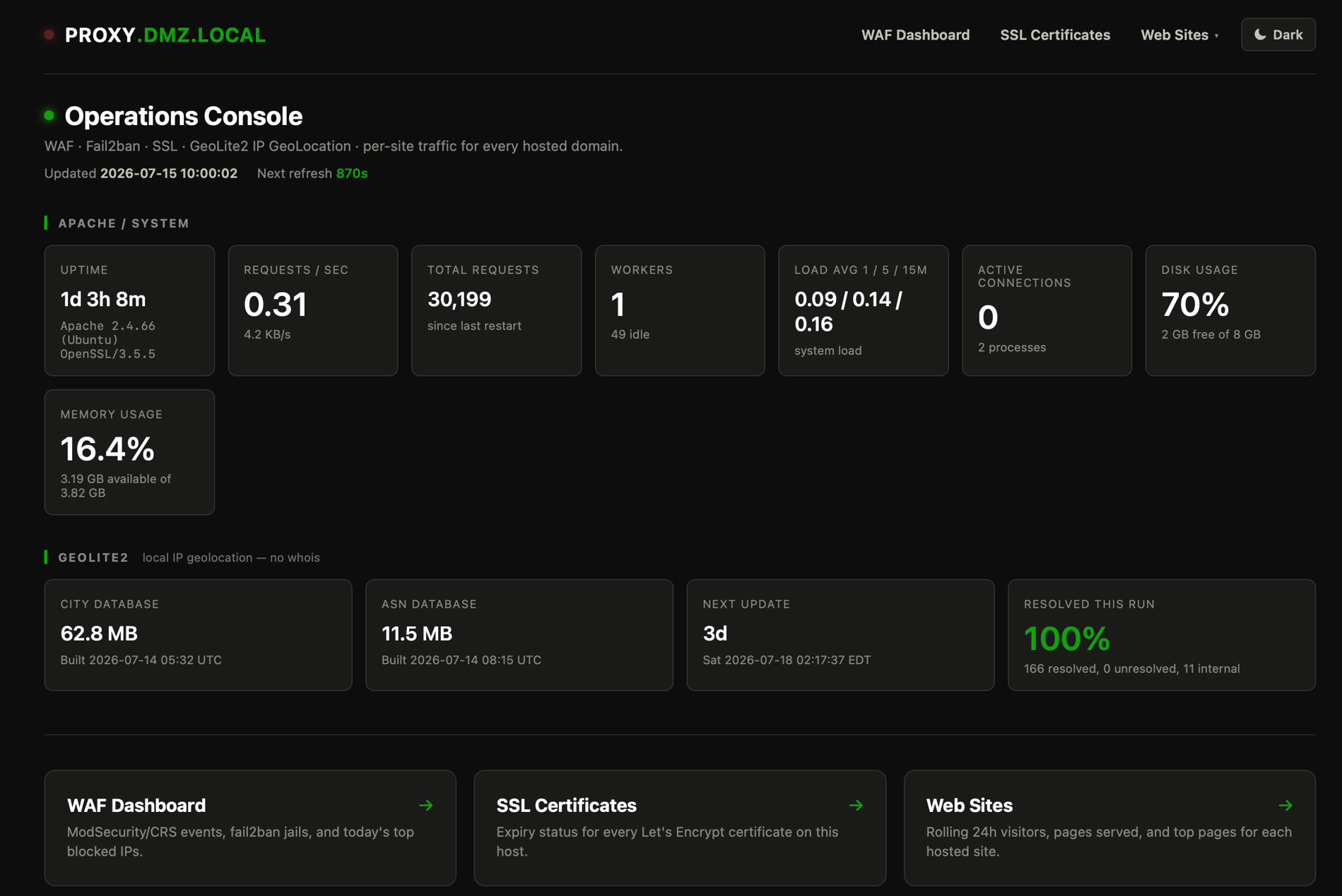
The console is how I get a glance at all of the pieces that make my web server work without diving into piles of analytics and logs. Across the top it shows Apache and system health: uptime and version, requests per second, total requests since the last restart, worker and connection counts, load averages, disk and memory. Below that, MaxMind GeoLite2 city and ASN databases used for local IP geolocation on blocked and interesting traffic — no external whois calls, just files that age out and get rebuilt on a schedule. Three more links cover the rest: a WAF Dashboard for ModSecurity/CRS events, Fail2Ban jails, and today’s top blocked IPs — just because I like to keep my eye on the bad guys; SSL Certificates for Let’s Encrypt expiry across every web site domain name on the host; and Web Sites for rolling 24-hour visitors, pages served, and top pages per domain. The green hostname and refresh timestamps tell me the collector ran; if they go stale, something on the box stopped talking.
The sites themselves are mostly static document roots under /var/www/.
A few hostnames reverse-proxy deeper into the network — the
AwesomeHeroSteve
Minecraft map subdomains, for example — but the public HTML for those web sites still
starts here.
thehaneys.netThis site — family pages and articlesect-consulting.comMy IT consulting practicearrg.usAmateur radio club sitexlxreflector.orgHam Radio Reflector dashboards, reports, and how-tosawesomeherosteve.netMinecraft portal (+ map reverse proxies)smhfotografie.comPhotography portfolio (gallery + articles)smh3d.com3D printing / fabricationsteveblogs.netMy failed blog’s memorial pagerufflesandplaid.comJulianne’s side project
It is not a huge fleet. It is still enough that “I’ll just FTP one file” stopped being a strategy years ago. Shared navigation fragments, a sitemap tool, daily traffic reports, and a WAF that actually blocks things keep me from treating a dozen public domains like a hobby homepage.
Self-hosting does not remove outages. It removes the fiction that they were caused by someone else.
Apache, On Purpose
When people find out I run this stack, the first word that usually throws them is Apache. The fashionable default for new projects is often nginx, and for reverse-proxy-only jobs it is excellent. I already know Apache deeply — and I should. I’ve been working with it for over 30 years. The sites need virtual hosts, TLS termination, access control by IP for internal tools, reverse proxies for a few backends, and Server Side Includes so headers and footers are not copy-pasted twelve times.
SSI shows up in two dialects here. Some sites enable includes for every
.html file. Others use Apache’s XBitHack: only pages with the execute
bit set get parsed. That second one is useful and easy to forget. Deploy a clean rsync
and forget to chmod +x the public pages, and the navigation includes
vanish and the page looks half-built — not because the HTML broke, but because
Apache stopped treating the file as something to process.
None of this needs a container platform. It needs configuration files in version
control, a habit of apache2ctl configtest before reloads, and
remembering that “it works in my laptop preview” is not the same as
“www-data can read it on the proxy.”
The Firewall in Front of the Files
Static HTML is a smaller attack surface than a content management system, but it is
not invincible. Bots still hammer login paths that do not exist. Scanners still probe
for wp-admin, PHP shells, and yesterday’s CVE of the week. So the
proxy runs ModSecurity with the OWASP Core Rule Set, kept closer to upstream than the
lagging distro package alone would allow.
A small daily job checks GitHub for newer CRS releases, installs them into the path Apache actually loads, holds the apt package so a routine upgrade cannot silently downgrade the rules, and mails me when something changes or fails. That is not glamorous work. It is the same habit I want at the edge of a client network: know what version is live, when it last changed, and whether the update job still works.
Blocking one request is not the same as getting rid of the source. That is where
Fail2Ban
comes in. It watches the Apache and ModSecurity logs and, after enough bad behavior,
adds a temporary ban in iptables so the offender stops reaching the sites entirely.
On this host the jails are deliberately boring and specific: repeated ModSecurity
hits, scanners hunting for .env / .git / WordPress
config files, xmlrpc.php hammering that has no legitimate business on
a static fleet, plus the usual SSH brute-force jail. ModSecurity decides the request
is hostile. Fail2Ban decides the IP has worn out its welcome.
I care about more than “Apache is listening on 443.” The Zabbix templates for this host watch blocked attacks, Fail2Ban bans, and — most importantly — whether the rule engine is still actually enforcing. A WAF that slipped into detection-only without anyone noticing is worse than no WAF, because it teaches you to trust a green light that is lying. The ops console treats ModSecurity and Fail2Ban together for the same reason: a blocked request and a banned IP are part of the same problem.
Every morning, a traffic report digests yesterday’s vhost logs: hits, status codes, and ModSecurity denials broken out per site. Most days it is quiet noise. Some days it is a reminder that bots keep working overnight while the rest of the house is asleep.
Deploy Is Half the Job
Content lives in a git-backed tree on a Mac, synced through iCloud between the Mac
Studio in my office and the MacBook Air I work from outside the office, then pushed
to the proxy with rsync: stage under /tmp, promote into
/var/www/<site> with root, fix permissions, spot-check with
curl. There is no CI pipeline that ships on a green checkmark. There is
me — someone who can break production with a mistyped path, and who can fix it
without opening a ticket with a cloud provider.
The permission trap gets its own paragraph because it is so ordinary. Files that
leave a Mac via rsync often arrive as owner-readable only. Apache runs as
www-data. Directories need to be traversable; files need to be
world-readable (or at least group-readable by the server). Skip that step and you
get 403s that look like security events and feel like mystery outages. The fix is
not clever. It is a checklist I run every time:
Looks Done
What Seems Finished
- rsync finished without errors
- The file exists on the server
- I can open it over SSH as myself
Sitemaps are another deliberate choice: they are regenerated by a script on the proxy when pages are added or removed, not by a timer that quietly rewrites priorities while I am not looking. I have been burned by automation that “helped” by treating every HTML file as equal and by treating directory prefixes as ignore rules when only exact paths should have been ignored. Doing it by hand after a content change is slower. It is also honest about what changed.
Why Keep the Blast Radius at Home
Self-hosting public sites from a business fiber internet connection at home is not the default advice in 2026. Object storage in the cloud and a content delivery network are fine tools. Managed WordPress sites are fine for people who do not want to deal with all of this. I keep the web sites here for reasons that are part professional and part personal.
Professionally, it is practice. Virtual hosts, WAF tuning, certificate renewal, log hygiene, reverse proxies, careful deploys — the same skills I use on client work, practiced on systems I am allowed to break and fix without a change board. When ModSecurity false-positives happen, I learn something about rule exclusions. When a reverse proxy to a Minecraft map hiccups, I learn something about backends and timeouts.
Personally, the content is not generic. A family article, a club bylaws PDF, a reflector how-to, a photography portfolio with a real gallery and writing — these are small sites with real names attached. I do not want their availability, their headers, or their log retention decided by a plan tier I forgot I was on. If something is wrong, the path from symptom to root cause stays inside a network I already monitor for cooling, disks, and failover.
There is also a simple preference: open source where it matters. Apache, ModSecurity, CRS, Fail2Ban, Ubuntu, Let’s Encrypt, Zabbix on the side. The stack is boring on purpose. Boring is a good thing when the alternative is a CMS plugin ecosystem that rots every six months.
You can lock every door for safety. That only works if the right person still has a key when something goes wrong.
What This Is Not
I am not arguing that every household should host web sites for a consulting firm in the garage, or that Apache beats nginx in some universal ranking. Static HTML still needs care — certificates expire, rulesets update, disks fill, hurricanes visit Florida, and people rsync with the wrong flags.
It is just a description of what works here: a DMZ proxy that answers for a dozen public names, a WAF I actually watch, deploys that are not done until permissions and HTTP status say they are done, and an operator who knows that “the website is down” might mean anything from a CRS block to a file mode bit set by a laptop two rooms away.
The Bottom Line
Running public websites from home is not about proving I can escape the
cloud. It is about owning the path from keystroke to response headers. Apache,
ModSecurity, and Fail2Ban do the unglamorous work at the edge of the network. Static web site files keep
most things quiet. The real discipline is the checklist after every deploy: can
www-data read what I just published, and does the open internet
agree? When both answers are yes, the house is doing its job — serving
pages, logging what matters, and failing in ways I can still explain.